All your AIs on the same team.

Claude can’t draw. ChatGPT can. Tag them both in one message and they build it together.

Stop all
Open ↗

Ten agents · one conversation

Make them talk to each other.

Tag them in one prompt: “@ChatGPT make me a logo, @Claude build the website.” They talk to each other and get it done.

No limiton agents per project
All majormodels supported
1 promptstarts the whole team
OmniAgent Projects

Projects built with OmniAgent

Each one started as one message to a team of agents. Copy the prompt and run it yourself.

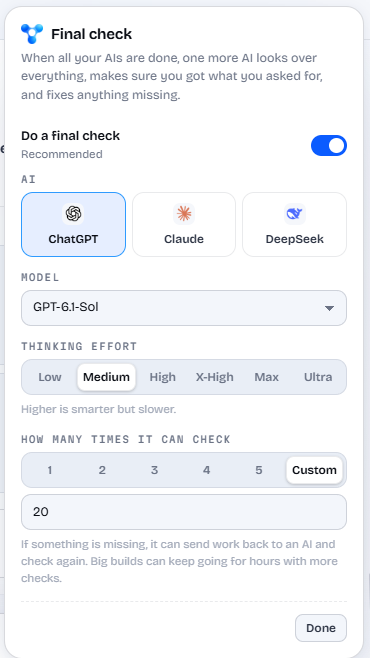
The final check

Who decides it’s done? You do.

With ten AIs on one project, someone has to call it finished. You pick the model that runs the final check. It reviews everything against your request, fixes what’s missing or sends work back, then stamps it.

Choosing the AI, model and effort for the final check
  1. 1

    The team finishes

    Every AI hands in its part, its files and its notes.

  2. 2

    Your chosen model reviews it all

    ChatGPT, Claude, DeepSeek or any AI you connect, at the thinking effort you pick.

  3. 3

    It fixes gaps or sends work back

    As many rounds as you want. Pick Custom and a big build can run 20 checks overnight while your computer works.

Inside the app

Your whole AI team in one window.

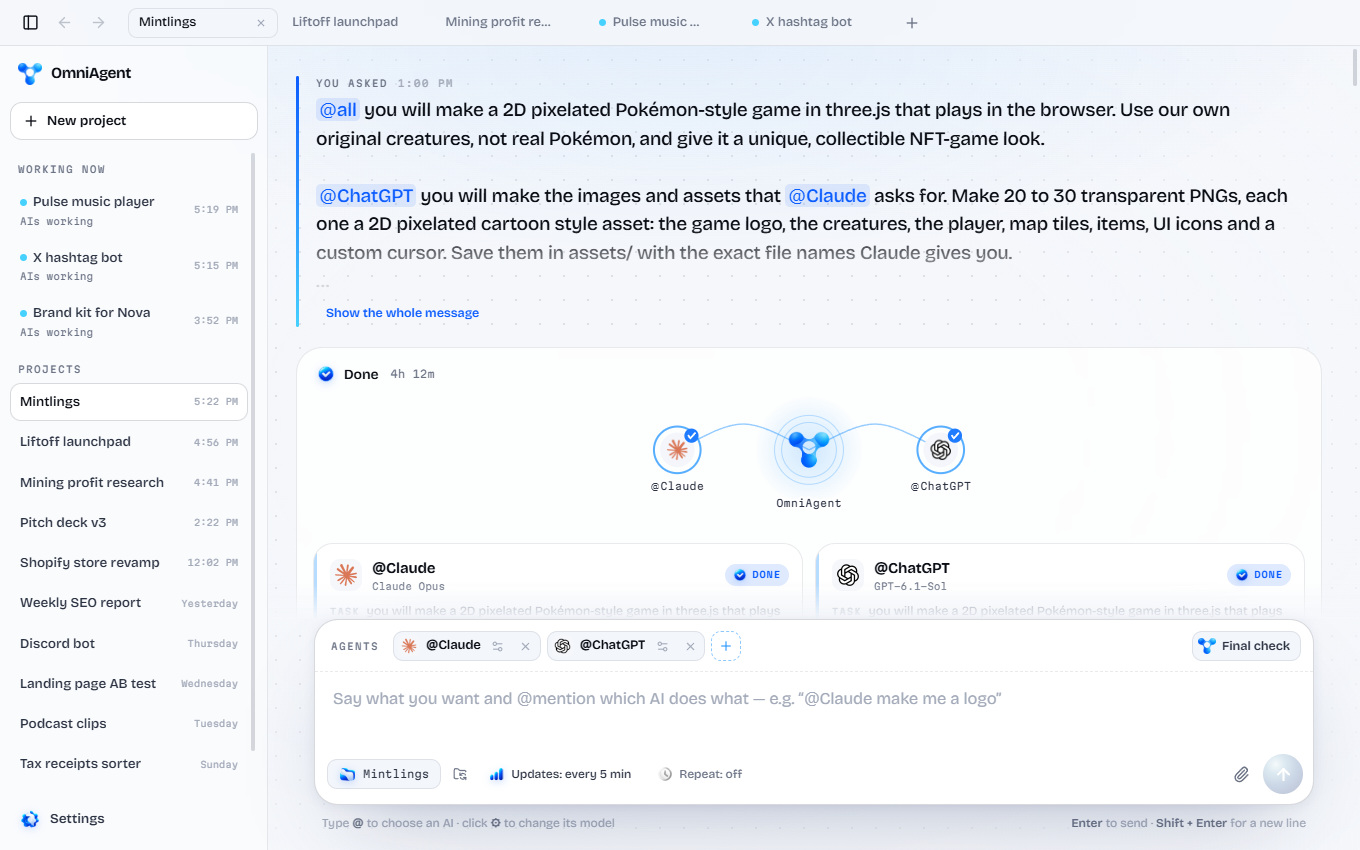
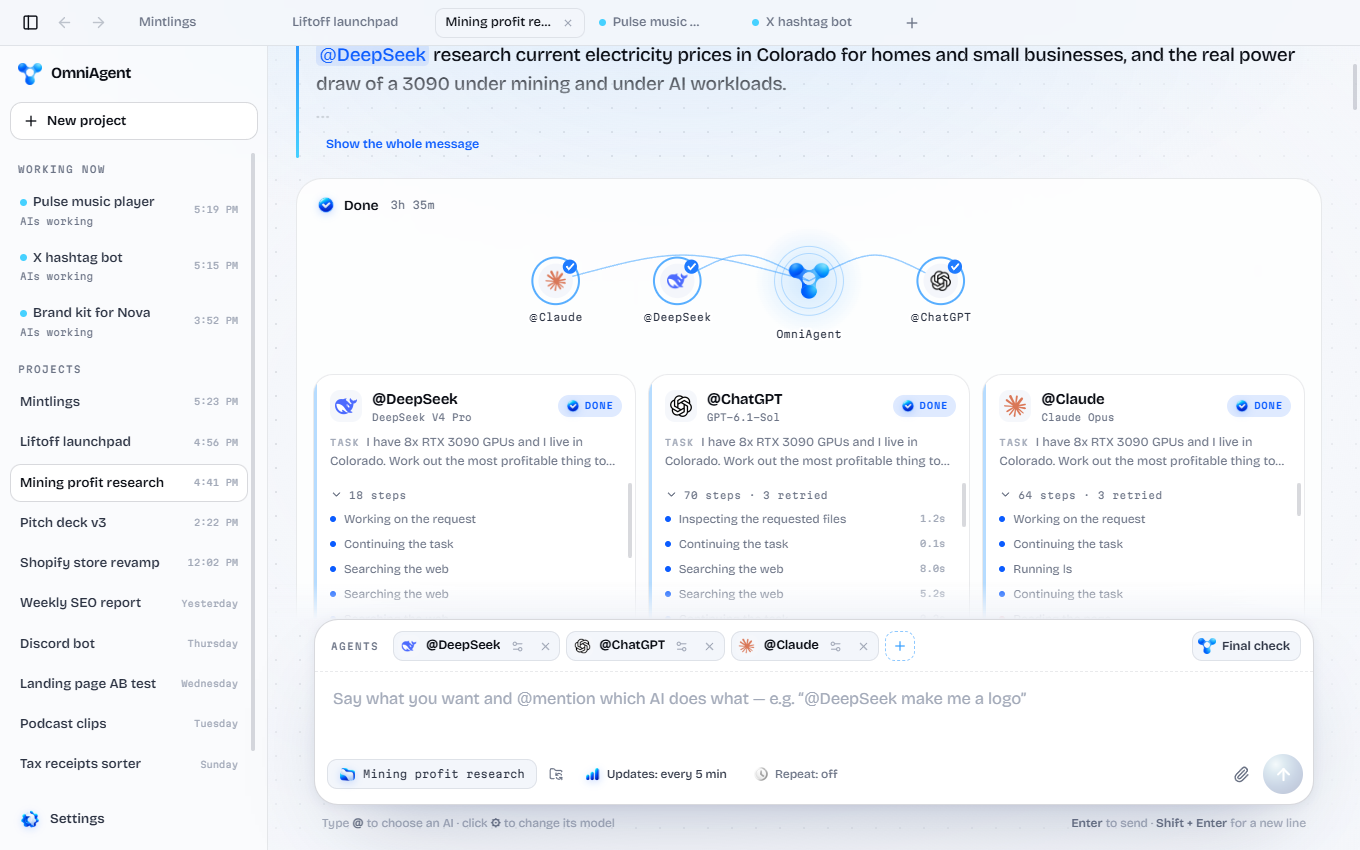
OmniAgent with many projects open as tabs

Switch projects like browser tabs.

Every project opens as a tab. See which ones your AIs are working on right now, jump between them, and pick any of them up later. Each one lives in its own folder.

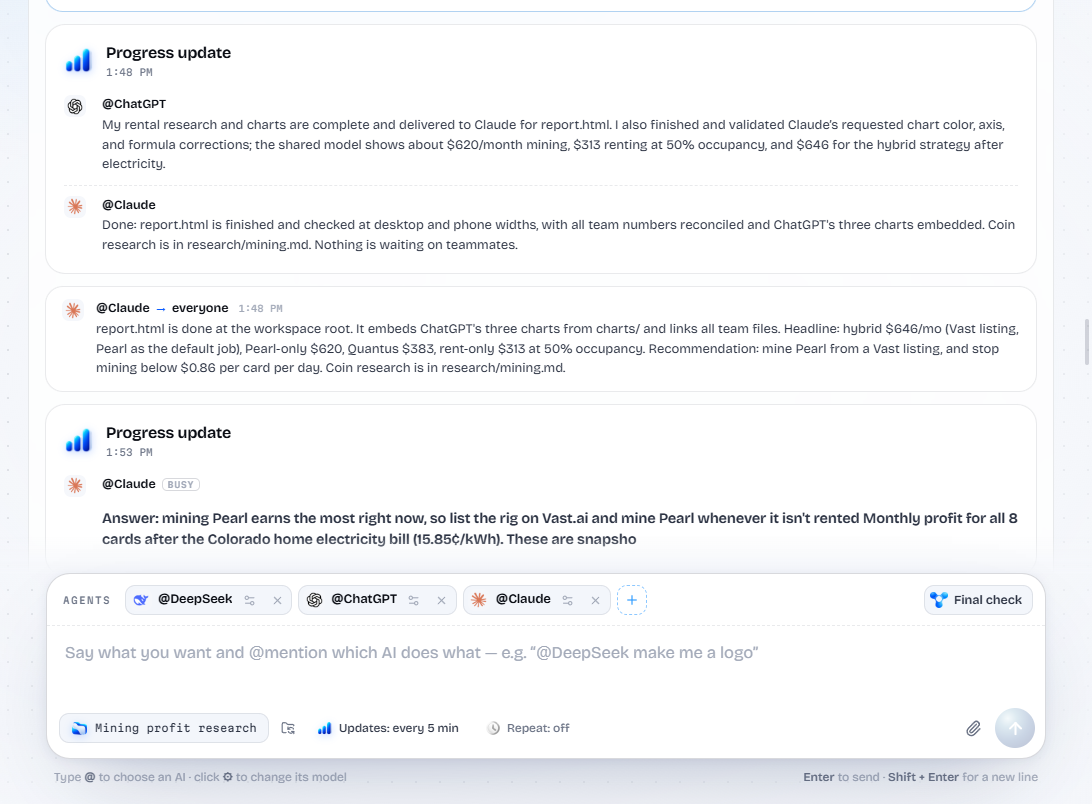
A progress update from ChatGPT and Claude

Progress updates.

Every few minutes each AI tells you what it finished and what’s next, on a timer you choose. Step away, come back, and catch up in one glance.

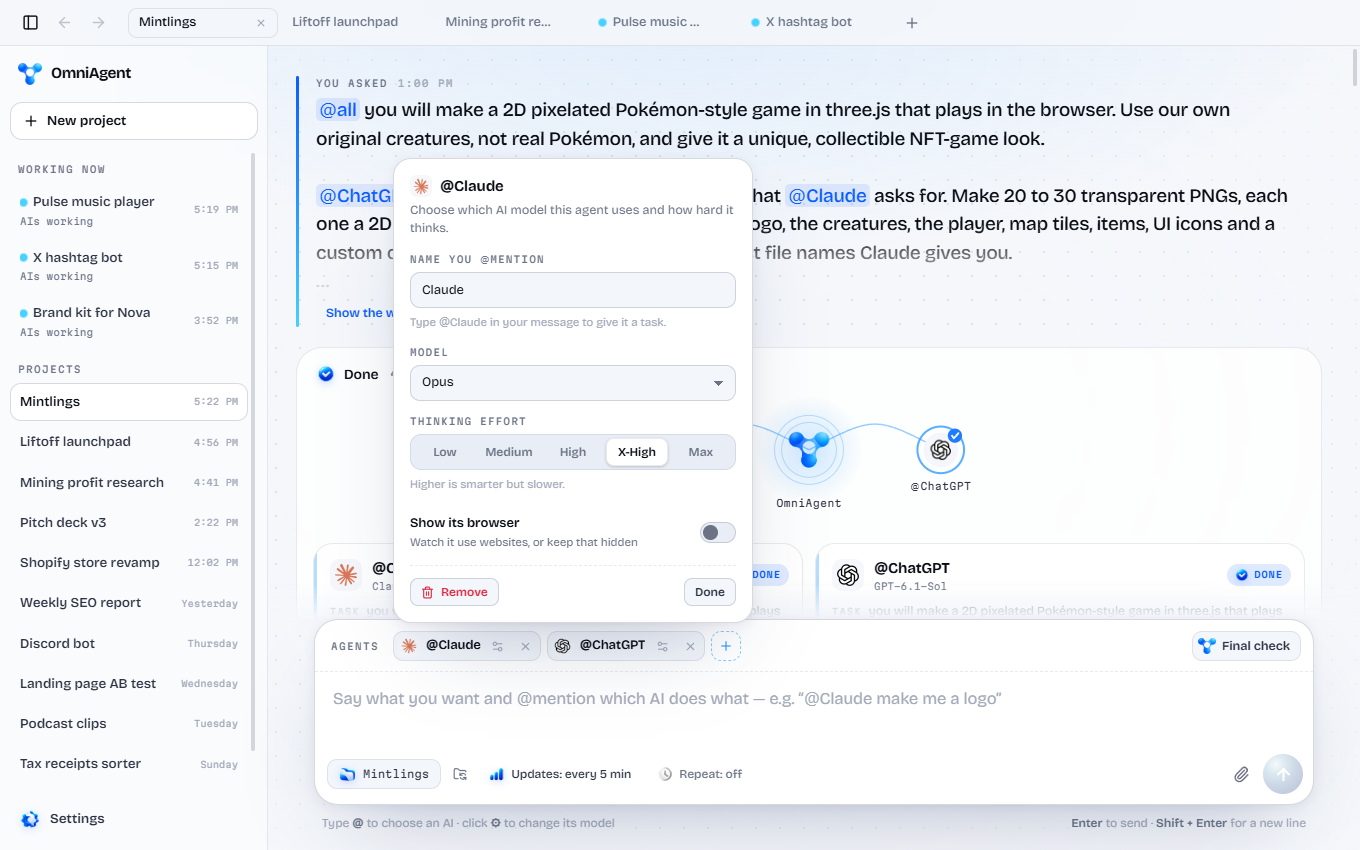
Choosing a model and thinking effort for an AI

Tag agents. Then tweak them.

Every @ has its own settings. Pick the exact model and how hard it thinks, add the same AI twice for different jobs, or turn on its browser so you can watch.

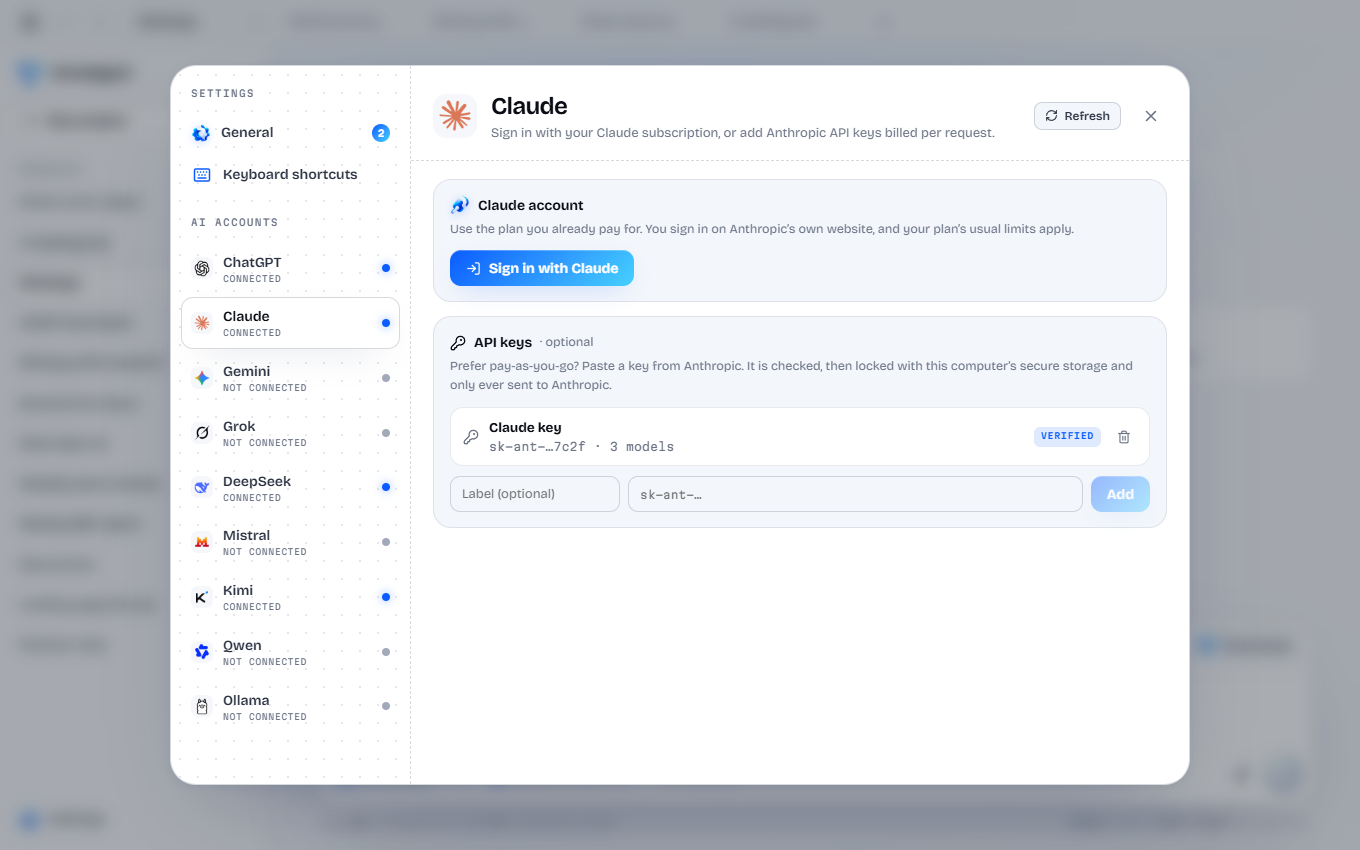
Signing in to Claude or adding an API key

Log in or paste a key. That’s it.

Log in or use API keys for ChatGPT, Claude, Gemini, Grok, Muse, DeepSeek, Mistral, Kimi and Qwen, or pick from thousands of open-source models that run on your own hardware. Choose the latest models and set how hard each one reasons. Keys stay locked on your computer.

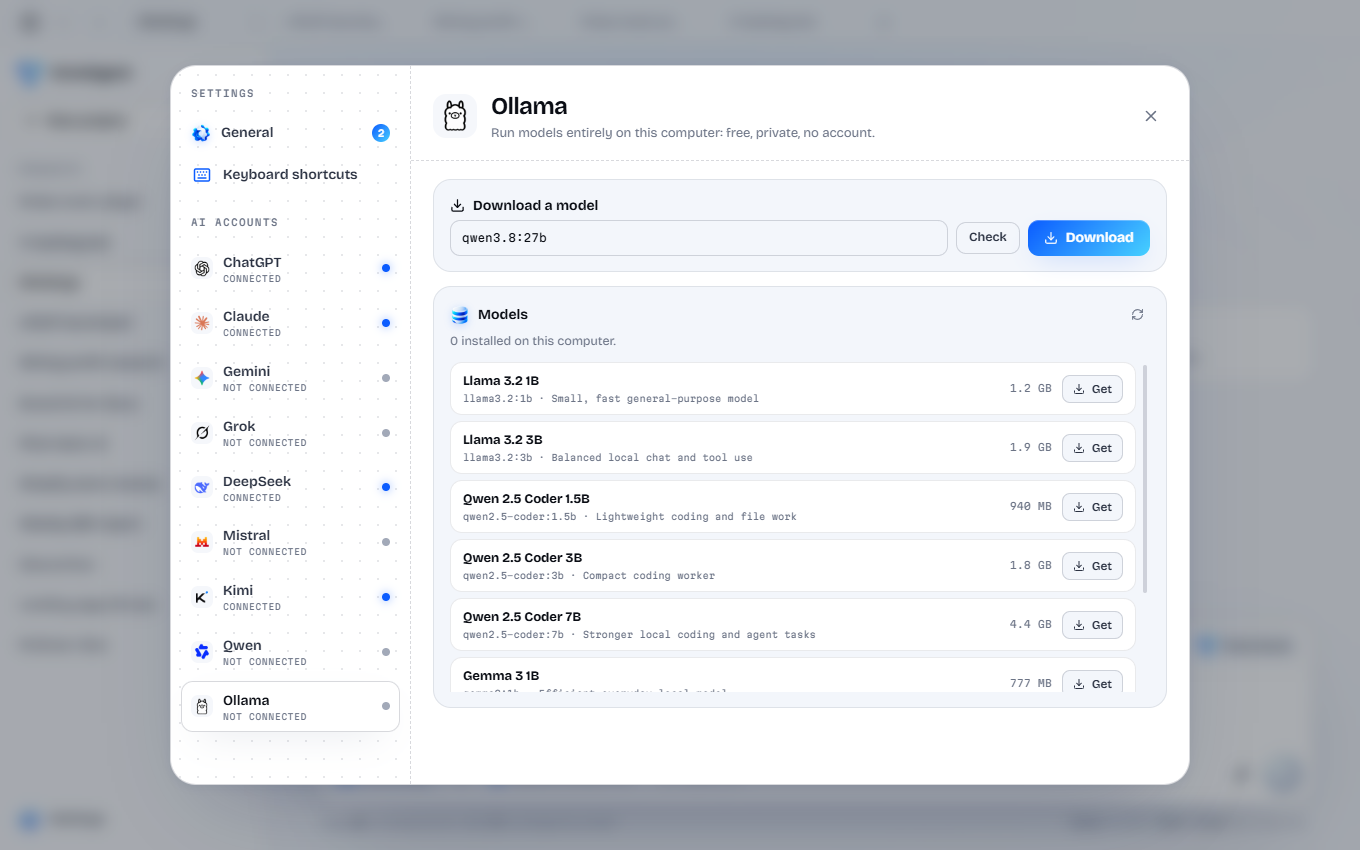
Downloading free open models

Free open-source models.

With Pro, run any popular open-source model, such as Qwen 3.8 27B, locally on your own computer. Free, private and offline, on the same team as everyone else.

AIs working with tools on the computer and in the browser

They use your computer.

Your AIs come with MCP tools: they can open a browser, click, type, read and write files, and run what they build to check it works. You see every step as it happens.

Core or Pro

Get started with OmniAgent.

Start free with ChatGPT and Claude. Burn 5,000 $OMNI once for OmniAgent Pro and put every AI on the same team.

OmniAgent Core

$0

Uses the AI plans you already pay for.

  • ChatGPT and ClaudeLog in with your plan or paste an API key.
  • Agents talk to each otherThey ask for files and share decisions while they work.
  • A final check, every timeOne more AI reviews the work and stamps it.

OmniAgent Pro

5,000 $OMNI

Burned once. Yours for good.

Everything in Core, plus:

  • Gemini, Grok, Muse, DeepSeek, Mistral, Kimi and QwenEvery major AI on the same team as ChatGPT and Claude.
  • Free offline modelsRun any popular open-source model, such as Qwen 3.8 27B, locally.
  • Mix every AI on one teamGrok on X research, Muse on design, DeepSeek on numbers, Claude on code.
  • No subscriptionOne burn of 5,000 $OMNI unlocks Pro for good.
How to get Pro

Both plans include

No limit on agents Progress updates Computer and browser use Projects as tabs Repeat on a schedule Private by default

How to get Pro

1

Get Phantom

Install the Phantom wallet, create a wallet and add a little SOL for fees.

phantom.comOpen
2

Buy $OMNI

Open PumpSwap, paste the contract address, connect Phantom and buy 5,000.

3

Burn 5,000 $OMNI

In Phantom tap Send, paste the Solana burn address and send exactly 5,000.

4

Paste the receipt

Open OmniAgent, go to Settings, then Pro, and paste the transaction ID from Phantom.

Settings → Pro

Questions

Good questions.

How does it work?

Tag an agent. Example: “@ChatGPT make me a logo, @Claude make me a website”. They both get it done.

Does it increase AI usage?

Barely. OmniAgent adds about 2,500 tokens to each agent so it knows its team and its tools. Most of these agents have a 1M-token context window, so that’s about 0.25% of it.

How much does it cost?

OmniAgent Core costs nothing, but every AI you add needs its own paid plan or API key. For ChatGPT and Claude that’s at least $40 a month: $20 for ChatGPT Plus and $20 for Claude Pro, because neither company lets you sign in to an app like OmniAgent on a free plan. API keys are pay per use instead, so you can mix a cheaper team: DeepSeek API credit can be loaded for as little as $2, a Grok Premium subscription is $15 a month, and Hugging Face models are free if your computer can run them. Pro is a one-time burn of 5,000 $OMNI.

Do I need a paid ChatGPT, Claude or Grok account?

Yes. Sign in with your ChatGPT, Claude or Grok plan, or paste an API key if you prefer to pay per use. Grok comes with Pro. OmniAgent uses your own accounts, so you never pay twice for the same AI.

Which agents can I use?

ChatGPT and Claude on Core. With Pro, add Gemini, Grok, Muse, DeepSeek, Mistral, Kimi and Qwen, plus free offline models through Ollama. Muse, Mistral, Kimi and Qwen connect with an API key from each company.

What can I make with it?

Basically anything a team of agents can build together: front ends and back ends, playable games, web3 launchpads, desktop apps, trading research, reports with charts, and videos. If one AI can’t do a part, another one on the team can.

Can it control my computer?

Yes. The agents have tools to use your computer and browser: they can open pages, click, type, read and write files, and run what they build to test it. You can watch every step and stop them at any time.

Is my data safe?

Your projects are saved on your computer, not on our servers. API keys are locked with your computer’s secure storage and only ever sent to the AI company they belong to.

What is the $OMNI supply?

$OMNI in total, launched on pump.fun on Solana.

Why 5,000 $OMNI for Pro?

It’s a small amount on purpose, so Pro stays open to anyone who holds $OMNI. Burning it once proves you’re a holder and unlocks Pro for good.

Which computers does it run on?

Windows, macOS and Linux.

Get OmniAgent.

Pick a folder, tag your agents, send. Core is free with ChatGPT and Claude.